

Feb 6, 2026
Automated Security Testing: Comprehensive Guide to Modern Cyber Defense

Speed drives software development nowadays. Teams switch to daily deployments from quarterly upgrades. This pace stimulates innovation, although it also presents a considerable danger. The window for validating security diminishes with every run. Security teams sometimes struggle to keep up with the pace of current DevOps workflows. Manual reviews are too sluggish.
The key to distinguishing a secure application from a vulnerable one is automated security testing. It develops a system where security testing services serve as a permanent element of the development lifecycle. Organizations may ensure that every line of code receives testing before it is distributed to the public. Both user data and the company's reputation are safeguarded in this way.
What is Automated Security Testing?
Software tools are used in automated security testing to carry out predetermined system tests. A human analyst searching for defects is the foundation of manual testing. Automation depends on scripts to scan programs for known vulnerabilities. These programs examine source code, mimic assaults on an active program, or look for out-of-date third-party libraries.
The major purpose is to discover flaws with little human interaction. This enables regular, consistent testing that scales with your project. Manual testing is good in finding sophisticated logic problems. Automation is great at doing the same thing over and over again, which would wear out a human tester. It makes sure that common vulnerabilities, including those in the OWASP Top 10, are found right away. This frees up human specialists to focus on advanced threats.
Why Automation is Necessary Now
The internet world is unfriendly. Cyberattacks are frequently automated operations that scan the internet seeking flaws. If your defense depends exclusively on manual inspections, you operate at a disadvantage.
Speed of Development: In a CI/CD setup, code updates happen constantly. A manual penetration test can take two weeks. By the time the report comes, the code has changed five times. Automation runs in real-time. It delivers feedback instantly. Developers can repair bugs before going on.
Cost Efficiency: The longer it takes to resolve an issue, the more it costs. A bug detected during the coding process might not be too expensive to remedy. That identical problem identified in production might cost thousands of dollars to fix and incur legal fees. Automated security testing moves detection "left." It finds problems when they are easiest to fix.
Consistency and Coverage: Humans become fatigued. They could miss a check on Friday afternoon that they would collect on Tuesday morning. Automated tools do not suffer from tiredness. They perform the exact same checks every time. This ensures a constant baseline of security across the whole application.
Common Security Failures and Their Impact
To see the value of automation, look at what happens when security fails. History shows that many top software failures due to lack of testing result from known vulnerabilities left unpatched or configurations left unchecked.
Cloud Misconfigurations
Complexity increases as companies migrate to the cloud. One unchecked box can leave storage buckets open or grant excessive permissions. These errors lead to massive data leaks. Automation scans continuously to verify that IAM roles and storage settings remain private, preventing unauthorized access to your cloud infrastructure.Weak OS-Level Security
Security relies on the underlying operating system protocols. Using outdated Transport Layer Security (TLS) versions allows attackers to intercept sensitive data. Unpatched OS kernels provide easy entry points. Automated scans identify these weak configurations and flag outdated components for immediate upgrades, keeping your foundation solid against attacks.Injection Vulnerabilities
Injection flaws occur when untrusted data is passed to an interpreter. Attackers trick the system into executing malicious commands, potentially exposing entire databases. Automation detects these easily by simulating attack patterns against input fields. It verifies that the application rejects malicious code before execution, keeping your critical data safe.Broken Access Control
This happens when users act outside intended permissions. A standard user might access an admin panel or view private files. These failures lead to unauthorized information disclosure. Automated testing verifies role boundaries. It confirms users remain within assigned access levels and cannot escalate privileges to steal data.Cryptographic Failures
Data protection is mandatory. Failures include transmitting data in clear text or using weak encryption algorithms. When protections fail, sensitive data like credit cards remains exposed. Automated tools check for weak ciphers. They confirm that data transmission occurs over secure channels to prevent interception by malicious actors.
Essential Tools for Automated Security Testing
A successful strategy relies on a mix of different tools. Each catches specific types of issues at different stages.
Static Application Security Testing (SAST)
SAST tools analyze source code without executing the application. Teams use them early in the development phase. These tools identify coding errors, like buffer overflows. Since they look at the code from the inside, they point developers to the exact line number where the problem exists.
Dynamic Application Security Testing (DAST)
DAST tools interact with the application from the outside. They simulate the behavior of a malicious user. The application must be running for these to work. DAST finds runtime issues that SAST cannot see, like server configuration errors.
Software Composition Analysis (SCA)
Modern applications use open-source libraries. SCA tools scan your project’s dependencies. They check for known vulnerabilities. If a library has a security update available, the SCA tool alerts you.
Secret Scanning
Developers often accidentally leave credentials like API keys, passwords, or tokens inside the code. Secret scanning tools monitor repositories to detect these sensitive strings before they merge into the main branch. This prevents attackers from finding valid credentials and gaining unauthorized access to your internal systems or cloud services.
Interactive Application Security Testing (IAST)
IAST works from within the application. It uses an agent or sensor. It analyzes code execution in real-time as the app runs. This combines the benefits of SAST and DAST. It offers high accuracy with fewer false positives.
How to Implement Automated Security Testing
Implementing automation is a journey that requires careful planning. It is not as simple as installing a tool and walking away.
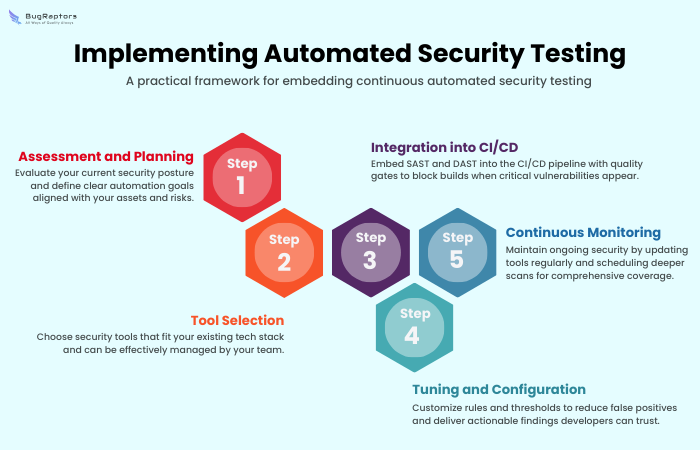
Step 1: Assessment and Planning
Begin by determining your current security posture. Identify assets to be enjoyed. Establish specific objectives that you desire with automation.
Step 2: Tool Selection
Select the tools that match your current technology stack. If your team uses Jenkins, ensure the security tools you select support it. Do not purchase complicated tools which will not be handled by your staff.
Step 3: Integration into CI/CD
Integrate the tools to your pipeline. SAST should be configured to execute on all commits. Make DAST an integral part of each build. Set up "quality gates." These stop the build in case critical vulnerabilities are detected.
Step 4: Tuning and Configuration
A great deal of tools have a high false positive rate. Tune the rulesets. This is in line with the context of your application. It reduces noise. The findings will be more trusted by the developers.
Step 5: Continuous Monitoring
Security is not a one-time setup. Update your tools regularly. Deeper scans should be scheduled to run once a week. This scans more thoroughly than fast scans would.
Overcoming Challenges in Automation
Implementing automated security testing comes with its own set of hurdles. They should be identified at an early stage to make planning a smooth transition.
Handling False Positives: One of the biggest complaints from developers is that security tools cry wolf. When a tool shows 100 bugs, out of which 90 are false alarms, developers will cease to pay attention. This can be solved by constant tuning and refinement of the rules of the tool.
Skill Gaps: Developers are not security professionals. They are possibly not aware of how to correct the vulnerability detected by the tool. It is mandatory to provide training and resources. A tool that indicates a bug must also give a clear description on how to remedy the bug.
Complexity of Integration: There are complexities of integrating security tools with legacy systems. They may need to write their own scripts or API connectors. Here, patience and a gradual strategy are important. Automate one step of the process before attempting to automate all processes.
The Role of Professional Software Testing Service Providers
Tools are effective, but they need skilled operators to function correctly. Partnering with top security testing companies eliminates the need to hire expensive internal staff. Professional providers offer several distinct advantages that strengthen your security posture:
Access to Specialized Expertise
Dedicated specialists are aware of the peculiarities of the tools and perceive the results correctly. Security testing services go beyond simple scanning to offer strategic guidance. Their fix priorities are based on business risk, and critical bugs must be manually verified to ensure that they are indeed threats.Unbiased Perspective
The internal teams tend to be blind to defects in code that they view on a daily basis. The external partner opens new eyes to the project. They see holes that internal personnel may miss and provide an objective evaluation of your system's health.Scalability for Growing Portfolios
This is because, as organizations are transformed from monoliths into hundreds of microservices, managing security becomes impossible. Test automation services allow you to apply rigorous standards across many projects at once. Security as Code also lets you create policy at the central level and enforce it over code on your complete infrastructure.Supporting Development Speed
With a larger engineering team, the rate of code production goes up. Such services make your infrastructure capable of sustaining the increased load without developing bottlenecks. This will enable you to increase your development activities without compromising your safety.
Looking Ahead: The Future of Security
The future of automated security testing is intelligent and proactive. There is an increase in the adoption of Artificial Intelligence (AI) and Machine Learning (ML) in the testing tools. The advanced systems are able to observe how vulnerabilities would be likely to occur based on past data, and hence, they can even detect the vulnerabilities much faster.
We are also heading to self-healing applications. Consider a scenario in which the security tool does not just identify a vulnerability, but a patch is created automatically to deal with the vulnerability, requiring human intervention to implement. This would greatly decrease the time-to-remediation.
The other trend is the shift left that has persisted. The security checks are being transferred directly to the Integrated Development Environment (IDE) of the developer. It implies that the developers will have security feedback as they type, just as a spell checker does nowadays.
Concluding Thoughts
Security cannot be an afterthought. It must be woven into your development process. Automated security testing provides the only path to securing applications at the speed of business. It empowers your team to innovate with confidence. A robust safety net is always in place.
Technology is only half the equation. The right expertise is vital. BugRaptors serves as the ideal partner. As a premier software testing organization, BugRaptors delivers world-class security testing and test automation services. By combining automation with human intelligence, BugRaptors guarantees your software is functional and secure.

Tushar Kashyap
Security Testing
About the Author
Tushar Kashyap, Security Testing Manager at BugRaptors, brings over 14 years of extensive experience in Security testing. Holding Multiple security certifications, Tushar has a diverse testing background, having contributed to projects across various domains. His experience spans both outsourced and insourced projects, showcasing his versatility in adapting testing methodologies to different environments. His leadership ensures the seamless implementation of robust security measures, contributing significantly to the success and integrity of projects across different domains and project structures.


