

Sep 9, 2026
Enterprise Accessibility Framework: Reducing Compliance Risk and Technical Debt Across the SDLC
Enterprise firms have changed how they evaluate software quality during digital transformation. Digital accessibility is not a “nice-to-have” design consideration or a “checklist” item before launch. This is a key measure of software architecture, enterprise readiness, and operational efficiency.
When accessibility is an afterthought, it can lead to delays, costly repairs, product weaknesses, and immediate disqualification in business procurement processes. Forward-thinking product and engineering teams prioritize quality engineering, including robust accessibility testing at every level of the software development lifecycle (SDLC).
Shift accessibility testing left, so compliance becomes a predictable delivery outcome instead of a reactionary scramble. Integrate verification into requirements, design systems, code commits, and continuous integration pipelines. This safeguards enterprise revenue, eliminates tech debt, and expands market reach.
Global Compliance Mandates: What QA Must Validate for Audit Readiness
Leaving accessibility requirements undefined exposes organizations to significant commercial liability and legal risk. Beyond internal engineering efficiency, digital accessibility functions as a non-negotiable prerequisite in enterprise procurement.
Enterprise clients demand verifiable conformance proof before executing long-term agreements. Testing teams must build verification matrices around active statutory mandates:
European Accessibility Act (EAA): Following the June 28, 2025 statutory enforcement deadline, the EAA mandates digital accessibility for e-commerce, banking services, and consumer software operating within the European Union. Non-compliance exposes firms to product bans and statutory fines across EU member states.
Americans with Disabilities Act (ADA) Title II and Title III: United States federal courts consistently interpret Title III as applying directly to commercial web platforms, mobile apps, and Software-as-a-Service environments. Furthermore, the Department of Justice Title II rule formally establishes Web Content Accessibility Guidelines (WCAG) 2.1 Level AA conformance thresholds for state, municipal, and public sector digital services.
HHS Section 504 Final Rule: The US Department of Health and Human Services enforces explicit digital accessibility mandates across healthcare providers, health insurance portals, and medical software solutions, holding digital patient tools to strict technical audit baselines.
Section 508 of the Rehabilitation Act: Mandates accessible Information and Communication Technology (ICT) for US federal agencies and government contractors. Enterprise vendors must submit an Accessibility Conformance Report (ACR) based on the current Voluntary Product Accessibility Template (VPAT) to qualify for vendor contracts.
The Accessibility Gap: Why Standard QA Pipelines Miss Critical Defects
Modern delivery pipelines struggle to catch accessibility regressions because standard testing practices rely on outdated operational assumptions. Functional testing frameworks confirm that buttons trigger database writes or route clicks correctly, but they remain completely blind to how those elements interact with assistive hardware.
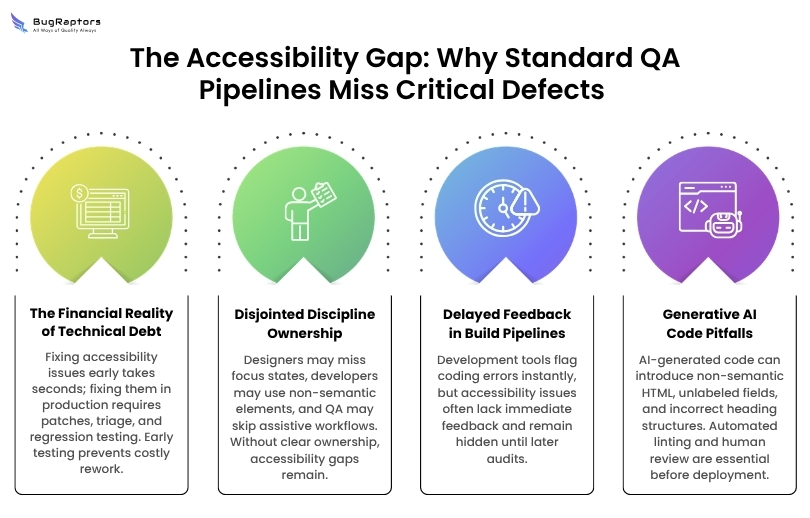
The Financial Reality of Technical Debt
Fixing accessibility flaws during sprint planning or in wireframes takes seconds. Found in production, the same issue demands cross-functional triage, emergency patch branches, and entire regression cycles.
Compounded markup errors eventually require massive DOM refactoring and component rewrites, burning engineering hours that should go toward shipping core features. Pairing your automated builds with seasoned software testing services ensures that accessibility regressions are caught alongside functional bugs, stopping structural technical debt before it merges.
Disjointed Discipline Ownership
Silos between disciplines leave major accessibility scenarios uncovered. Designers omit focus states and dynamic cues; developers build widgets with non-semantic containers lacking keyboard handlers; and QA teams validate business logic using mouse events while skipping assistive workflows entirely. When accessibility is treated as a generic shared concern, no one takes real ownership.
Delayed Feedback in Build Pipelines
Integrated development environments instantly notify engineers when code violates type definitions, linting rules, or unit assertions. Traditional build pipelines provide zero feedback when new code breaks accessibility trees or omits required ARIA properties. Major layout regressions remain hidden until third-party audits flag them months later.
Generative AI Code Pitfalls
AI code assistants speed up feature scaffolding, yet they frequently generate structural markup problems. These tools often output non-semantic HTML structures, such as clickable <div> elements missing keyboard focus handlers, form fields lacking associated <label> elements, and unnested heading hierarchies.
Treating AI-generated code as production-ready without automated static linting and structural inspection inserts silent accessibility bugs directly into your repositories.
The Role-Based Execution Playbook: Who Does What and When
Embedding accessibility across the SDLC requires concrete, role-specific engineering tasks throughout the feature lifecycle.
Product Managers and Business Analysts
Product leadership sets delivery expectations by defining accessibility criteria inside user stories before work enters sprint backlogs:
Specify explicit acceptance criteria covering keyboard navigation paths, visible focus management, and screen reader notification expectations.
Document target compliance levels (such as WCAG 2.2 Level AA) within technical specification documents.
Incorporate assistive technology user journeys into epic mapping and user stories.
Validate that prospective third-party component libraries and external UI widgets provide verified accessibility compliance before integration.
UI/UX Designers
Designers prevent upstream issues by establishing inclusive interaction models before development begins:
Enforce color contrast minimums across both light and dark display modes: 4.5:1 for standard text, 3:1 for large text, and 3:1 for interactive boundaries and graphic icons.
Define touch targets of at least 24x24 CSS pixels for web elements and 48x48 pixels for mobile controls, maintaining adequate margins between adjacent interactive components.
Design high-contrast, distinct focus indicators for every interactive button, input field, and menu trigger.
Annotate Figma wireframes with explicit reading orders, heading structures (<h1> through <h6>), and dynamic modal focus traps.
Frontend and Mobile Developers
Developers implement semantic code structures that interface cleanly with assistive technologies and operating systems:
Use native semantic HTML elements (<button>, <nav>, <main>, <header>) rather than building interactive controls out of generic containers.
Programmatically route keyboard focus during dynamic UI shifts, such as opening dialogs, expanding accordions, and navigating multi-step forms.
Apply Accessible Rich Internet Applications (ARIA) attributes strictly when standard HTML lacks the native semantics to convey dynamic state changes to assistive APIs.
Configure local linting engines (including ESLint plugins like eslint-plugin-jsx-a11y) to catch markup violations directly within development branches.
QA and Quality Engineers
Quality teams move from end-of-cycle audits to continuous, multi-layered verification across every build:
Integrate automated static scanning tools within pull request pipelines to detect structural issues, contrast breaks, and missing alternative text.
Execute manual validation sweeps using leading screen readers (NVDA on Windows, VoiceOver on macOS and iOS, TalkBack on Android) across critical user flows.
Conduct strict keyboard navigation audits to confirm that users can navigate all interactive controls without encountering invisible focus rings or keyboard traps.
Combine automated scans with real-world functional journeys to confirm that assistive technology users can complete transactions independently.
Cross-Platform Test Execution Considerations
Testing strategies must account for the distinct architectural characteristics of different digital platforms.
Web Application Verification
Web accessibility testing focuses heavily on responsive layout mechanics, viewport scaling, and DOM semantics. QA engineers verify that web layouts accommodate text magnification up to 400% without triggering horizontal scrollbars, losing functional controls, or overlapping text.
Automated checkers inspect page trees to confirm that layout landmarks correctly divide headers, main content containers, navigation menus, and complementary regions for screen reader navigation.
Native Mobile Application Testing
Mobile platforms rely heavily on system accessibility APIs, gesture controls, and dynamic OS configuration toggles. Structured mobile app testing services include:
Confirming touch targets meet minimum dimensions across varied screen densities and form factors.
Validating full compatibility with OS-level dynamic type settings up to 200% font scaling without truncation.
Verifying linear swipe navigation sequences through VoiceOver and TalkBack.
Maintaining layout stability and preserving active element focus during device orientation shifts between portrait and landscape modes.
Single-Page Application (SPA) Testing
SPAs built with modern frameworks update views dynamically without triggering classic browser page reloads, introducing specific interaction hurdles. Verification suites must confirm:
Client-side routing events programmatically transfer focus to the primary heading (<h1>) or main content container of newly mounted views.
Dynamic notifications, background network updates, and inline validation alerts broadcast immediately to screen readers via properly configured aria-live regions.
Interactive state components (including tabs, disclosure panels, and off-canvas drawers) update attributes like aria-expanded and aria-selected in real time as component states change.
The 4-Phase Enterprise Accessibility Testing Roadmap
Scaling accessibility testing across an organization requires a structured implementation roadmap that moves teams from initial discovery to continuous pipeline governance.
Phase 1: Baseline Audit and Gap Discovery
Begin by assessing active digital assets to locate systemic accessibility defects and establish baseline quality metrics. Run automated static scanners (such as axe-core and Pa11y) across primary code repositories, pairing scans with manual screen reader spot-checks across revenue-critical workflows like user registration, authentication, checkout paths, and account settings.
The primary deliverable for this phase is an objective gap analysis and an initial VPAT/ACR audit report. This documentation reveals your technical debt, highlights regulatory exposure, and identifies where components repeatedly fail baseline WCAG criteria.
Phase 2: Shift-Left Tooling and Component Governance
Focus on defect prevention by introducing accessibility tooling directly into day-to-day development environments. Equip frontend engineers with local IDE linters and pre-commit hooks that flag missing labels, invalid ARIA roles, and color contrast failures as code is written.
Simultaneously, audit and standardize your core design system component library. Remediating buttons, input fields, modals, and drop-down menus within your centralized UI kit ensures that downstream product teams consume fully accessible building blocks by default, preventing repetitive fixes across individual feature branches.
Phase 3: CI/CD Automation and Regression Gates
Incorporate automated accessibility verification into continuous integration and delivery pipelines (such as GitHub Actions, GitLab CI, or Jenkins). Configure automated test suites to run headless browser scans across pull requests, breaking builds whenever new commits introduce detectable accessibility violations.
Connecting these automated gates to broader enterprise regression testing suites ensures that ongoing feature updates do not degrade previously certified interfaces. Enterprise engineering teams that rely on structured regression testing services can systematically catch markup regressions before new code reaches staging or production environments.
Phase 4: Assistive Technology Validation and Continuous Governance
Automated testing catches structural markup issues, but it cannot evaluate usability or contextual coherence. The final phase establishes regular manual testing with native assistive tools, including keyboard-only sweeps and deep screen reader evaluations conducted by trained QA specialists.
Sustaining continuous compliance requires monitoring explicit key performance indicators across development cycles:
Percentage of centralized design system components certified for accessibility conformance.
Open accessibility defect counts categorized by severity across active development sprints.
Mean time to resolution (MTTR) for reported accessibility bugs.
Automated accessibility test coverage percentages across core end-to-end user journeys.
Building Inclusive Quality by Design
Treating accessibility testing as an afterthought creates technical debt, inflates engineering costs, and introduces substantial regulatory exposure in today's software market. In contrast, embedding verification throughout the software development lifecycle turns accessibility into a repeatable engineering practice.
By defining clear role responsibilities across product management, design, development, and QA engineering, organizations produce resilient software that welcomes every user. Shifting accessibility testing left protects enterprise revenue, reduces compliance risk, speeds sales cycles, and delivers dependable digital experiences across all platforms.

Abhishek Dogra
Manual Testing, Mobile & Web Application Testing, Performance Testing
About the Author
Abhishek is an QA engineer, working at Bug Raptors. He is passionate about ensuring software quality through meticulous testing and analysis. He is experienced in manual software QA and strive to deliver flawless user experiences. He is well versed with Manual testing, Mobile application testing, performance testing, Web applications testing and able to create effective documentation related to testing like test case, test report etc.


