

Nov 27, 2026
AI Visual Regression Testing: Improving UX Testing with AI

A small change in the user interface can create a big problem for users. A button can get pushed below the fold, text can overlay a picture, or a mobile layout can break with a new version. The program can still pass functional testing. But the experience can be worse than before.
This is where AI visual regression testing can come to help. Visual regression testing is for determining whether your application’s interface has changed in an unanticipated way across releases. The old ways usually compare a current screenshot with an agreed baseline image.
AI adds another layer to help teams understand those differences, uncover important UI changes, and avoid wasteful manual review. For enterprises managing web applications, mobile apps, SaaS products, and corporate platforms, this method can be used to simplify the process of scaling visual testing across browsers, devices, and frequent releases.
What Is AI Visual Regression Testing?
Visual testing ensures that the graphical interface of an application still renders appropriately following code, dependency, or style sheet updates. Traditionally, this was done by strict pixel-by-pixel comparisons.
When teams compared a baseline bitmap of a UI element directly with a runtime capture, builds would fail if a few pixels were off by more than an arbitrary threshold. Teams who are modernizing UAT with AI to test dynamic business flows are finding static pixel assertions soon become dated and create alert fatigue when working in high-velocity sprints.
Modern AI visual regression testing leverages computer vision and Document Object Model (DOM) layout understanding rather than fixed coordinate scanners. The testing engine doesn’t simply highlight raw pixel discrepancies. It evaluates visual layouts much like a seasoned quality engineer would:
Semantic Component Recognition: Recognizes layout elements as functional components and identifies cards, forms, navigation bars, buttons, and modals instead of isolated pixel clusters.
Layout Hierarchy Awareness: It processes structural relationships to ensure that child components have proper padding, line heights, and boundaries within fluid container grids.
Rendering Noise Rejection: It avoids minor browser rasterization idiosyncrasies, such as font smoothing inconsistencies between operating systems, but detects real visual layout faults.
How AI-Powered Visual Regression Works
A multi-tiered analysis flow is employed by contemporary AI visual testing platforms to integrate directly into headless browser execution cycles (such as Playwright, Cypress, or Selenium WebDriver):
DOM and Visual Surface Ingestion
The test runner captures the high-resolution viewport snapshot and the underlying DOM tree state when an automated test triggers an assertion. The system prevents the blind spots that are common to purely visual or purely structural checkers by directly correlating visual shifts with DOM hierarchy changes by capturing both layers together.
Visual Feature Extraction
The captured frame passes through computer vision models trained across millions of design tokens and UI patterns. These models extract layout boundaries, evaluate contrast, identify interactive controls, and map alignment grids across fluid viewports. Modern regression testing services increasingly incorporate these visual evaluation models to handle responsive UI checks that traditional DOM selectors miss entirely.
Dynamic Baseline Management
Maintaining hundreds of static golden baseline images across multiple viewports creates significant maintenance overhead. AI visual engines address this through dynamic baselining. They identify dynamic application variables and automatically mask those transient regions without requiring fragile XPath rules.
Contextual Diffing
When layout changes occur, the engine categorizes them by functional severity:
Benign Drift: Sub-pixel raster shifts and anti-aliasing differences that do not impact readability are permitted.
Intentional Upgrades: Global design system upgrades can be approved once at the root and then propagated to all dependent component baselines.
True Regressions: Actionable regression alerts are triggered by overlapping containers, clipped labels, hidden calls to action, and misaligned inputs.
Benefits of AI-Powered Visual Regression Testing
Incorporating AI visual regression testing into enterprise automation suites has immediate benefits in terms of release time and UI quality:
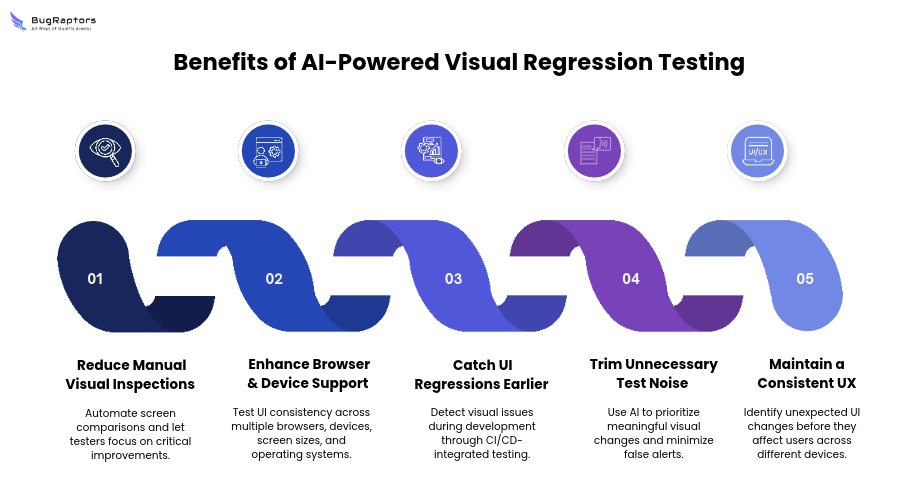
Reduce Manual Visual Inspections
Without automation, testers could be forced to continually verify screens of applications after every major update. AI-assisted visual testing can automate a lot of the initial comparison. Instead of painstakingly reviewing each screen, testers can spend more time exploring relevant improvements.
Enhance Browser & Device Support
Modern apps need to be cross-browser, cross-screen size, cross-OS, cross-device. As applications get bigger, it is hard to test every combination manually. Automated visual testing allows teams to execute consistent tests against a larger range of environments.
Catch UI Regressions Earlier
The sooner you detect visual problems that resulted from a code update, the easier they are to fix. Visual checks that tie into CI/CD pipelines give feedback to teams as they are developing and before a release goes to production.
Trim Unnecessary Test Noise
Many visual changes are challenging to handle in standard visual regression testing. Artificial intelligence can help classify changes and indicate which discoveries are more likely to be important issues. It doesn’t ensure every result is correct, but it can cut down on wasteful investigation.
Maintain a Consistent User Experience
Users want an application to look and work the same on the various screens and devices. If dev teams ship updates regularly, the teams can discover unexpected changes before they reach customers by performing regular visual checks.
Performing AI Visual Regression for UX Testing
Visual testing must connect directly to user journeys and automated build pipelines rather than running in isolation.
Shift-Left Component Audits
Do not wait for full end-to-end user flows to inspect layout integrity. Embed automated visual checks into component libraries (like Storybook) during pull request builds. Validating atomic design tokens before components merge prevents layout breakage from cascading into checkout funnels and multi-step customer journeys.
Responsive Viewport Permutations
Mobile responsiveness remains a frequent source of visual regressions. Run headless tests across diverse responsive breakpoints to ensure fluid grids reflow correctly and interactive buttons maintain compliant touch-target padding. Specialized AI testing services help teams automate these responsive matrix assertions across hundreds of browser and device permutations without slowing sprint velocity.
Coordinate Visual Checks with Acceptance Gates
Visual verification confirms layout correctness, but it must function alongside business workflow testing. Adding visual regression steps alongside functional acceptance suites ensures user journeys stay visually intuitive while executing critical transactions.
Establish Pipeline Governance
Ensure automated visual evaluations enforce explicit pipeline governance standards. Before deploying AI visual regression testing across production release stages, benchmark your automation infrastructure against an enterprise AI testing checklist to verify baseline stability, test data management, and CI/CD gating rules.
Building Long-Term Visual Quality
Visual bugs directly harm user trust. When a digital product suffers from clipped text, hidden action buttons, or broken responsive layouts, users drop out of conversion flows immediately. Manual UI reviews or fragile pixel-matching scripts are no longer viable in modern continuous deployment environments.
Engineering teams that run AI visual regression testing inside automated delivery pipelines systematically catch visual layout drift before it reaches end users. Choosing the right software testing company ensures that your visual test suites, automated pipelines, and regression gates deliver reliable software without adding maintenance overhead.
Rajeev Verma
Security Testing, Web & Mobile Testing
About the Author
Rajeev works as Project Manager at BugRaptors. He is working on several Web Applications, Network Vulnerability assessments, Mobile Applications, Secure Network Architecture reviews. Proven track record of successfully leading and mentoring cross-functional teams in dynamic environments. Work with all of the development teams to improve initial release quality, quality of production releases and agile development practices. He is passionate about leveraging technology to elevate QA practices and contribute to the success of innovative projects.


